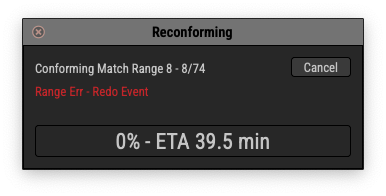
Hi there, yesterday I came across this annoying PT bug. Justin helped me find it. Posting here to share it with any other unlucky people.
Basically if you see this window normally frame rate doesn’t match. This can be set in the preferences in Matchbox and also in Pro Tools > Setup > Session. However even if every thing is set to the same frame rate I was still having this issue. I normally don’t have any video in my sessions because I use Video Sync for that. Apparently there’s a bug where Pro Tools frame rate —even when set— is wondering a bit if there’s no video in the session which is ALSO set to the same frame rate you set in both Pro Tools and Matchbox. Resulting in this error.
Hope it saves someones time!
Yeah, this was a tricky one:
If your session has no video file in it, Pro Tools will inherit the internal video framerate from whichever session was last open with a video file.
So. you might be in a 24fps session, but some part of pro tools thinks that video tracks are in 25fps, and then when you try to make a selection and copy/paste, the video tracks will snap your pasted selection to the WRONG frame boundaries. Which causes Matchbox to (quite rightly) throw an error.
It’s a pro tools bug, and only happens if you switch framerates between sessions, and only if you have zero video files in the session, and only if your selection includes the empty video track.
Wow, that one is definitely a weird one.
Thanks for sharing.