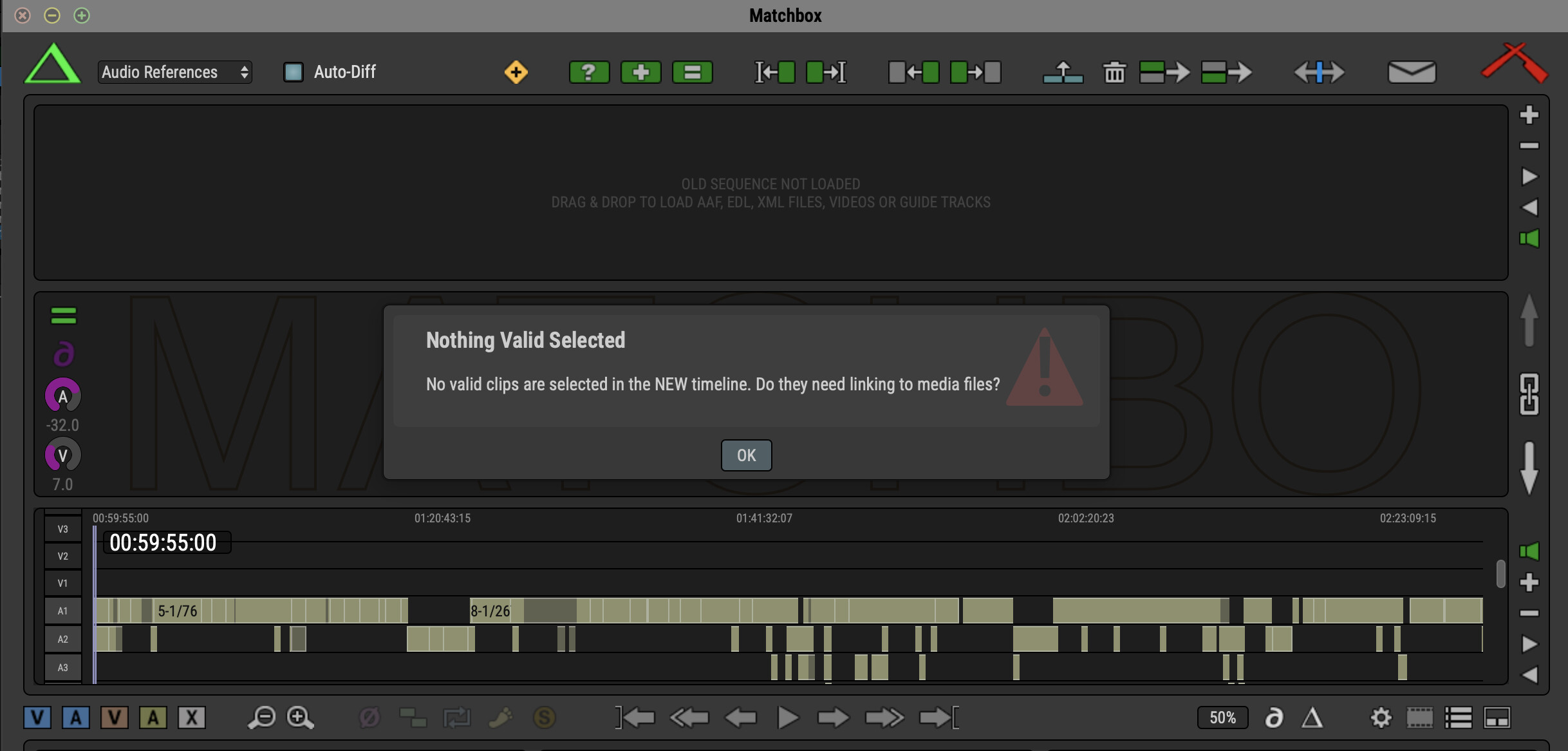
I received an AAF file with its Media Audio Folder and I couldn’t relink it to the Production sound files via the Field Recorder. I am trying to use matchbox for that but I don’t get any results.
I imported in the old sequence section the ref audio from the picture file and then in the New sequence the production sound. Then I right clicked on the ref audio and chose match back to external files, I chose the production sound folder, after the analysis I don’t see any other processing step.
Import the reference audio into NEW timeline.
right click it and “Match Back To External…”
Point it at the folder of all your production media.
Wait…
It will assemble new clips inside MB which you can then spot to PT using the menu command for that.
There are 3 modes for the audio matching tolerance but usually Standard is the best.
The initial analysis of all your files might take a while - do that on a grunty machine over a lunch or after work.
select all the clips you want to send to Pro Tools.
Reconform Menu → Assemble Selected in DAW
But first, make sure you have Pro Tools selected as your DAW in the reconform menu.
And hopefully you’re on Pro Tools 2025.6 because some of these new features either dont work as well or dont work at all in older versions of Pro Tools.
Relink AAF File to Production Sound Files does not work here.
Reference AAF in NEW timeline, right click it and “Match Back To External…”
And MB says: nothing valid selected. I don’t have the opportunity to point it at the folder of production media.
What am I doing wrong?